Calculate and explore
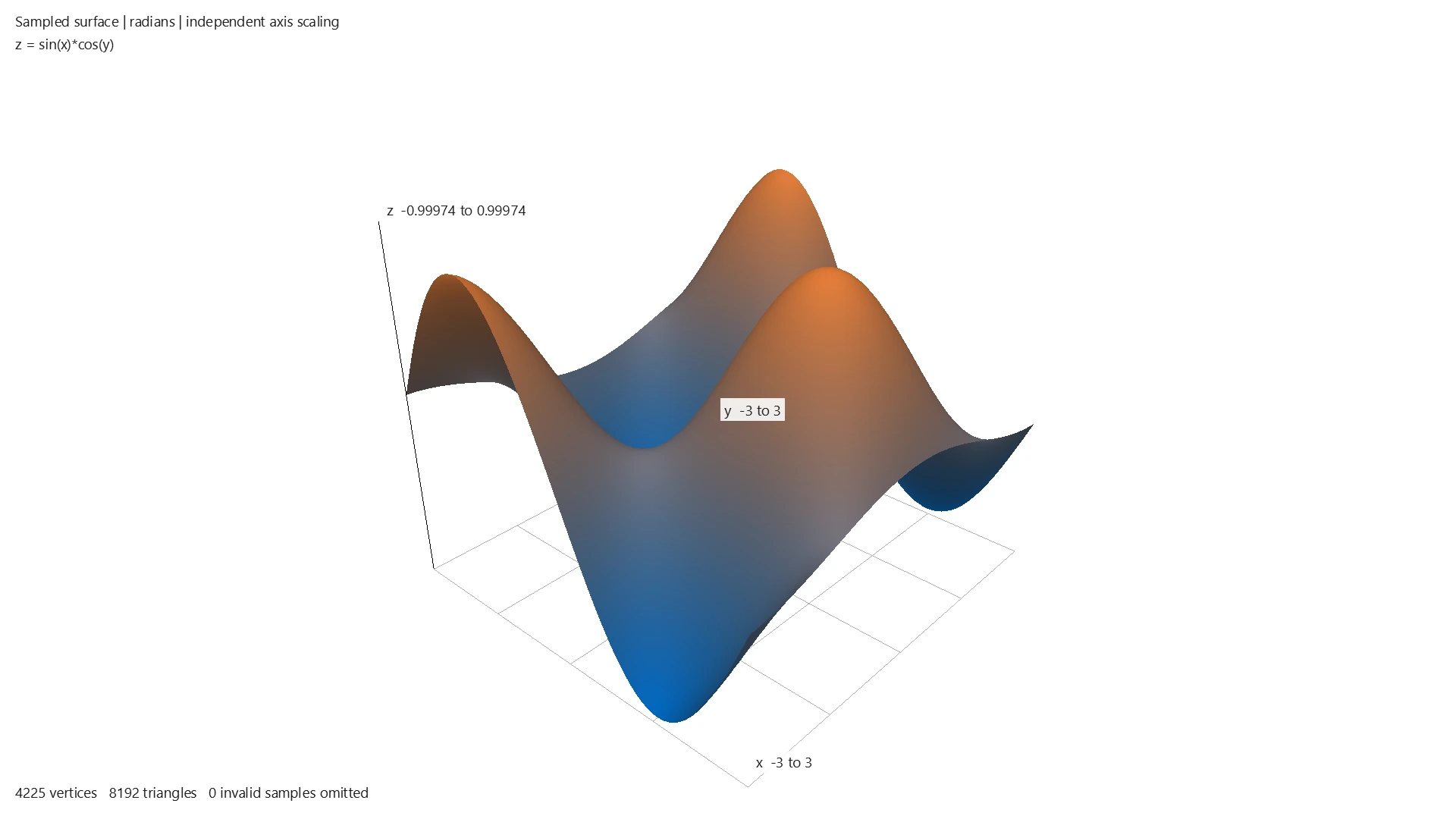
Keep supported fractions exact, work with units and matrices, and inspect algebraic restrictions. Explore a formula in a 2D graph or sampled 3D surface.
Start with a calculation →SumWise 3.2.1 · Scientific workspace for Windows
Calculate with supported exact algebra, explore 2D and 3D graphs, and compare data with guided statistical tools. Keep the inputs and results together, then reopen or share the work in one Windows app.
App interface: English • Español • Français • Deutsch
Try free for 7 days on Microsoft Store
US$24.99 one-time to continue. No Desktop subscription.
Local prices and availability may vary.
Windows 10 version 2004 or later, or Windows 11 · x64
Check the Store requirements for your device.
A supported exact-algebra example
Cancel a common factor without losing the original restriction. The result remembers that the starting fraction was undefined at x = 1.
See the steps and supported transfers →
Typeset example of a supported Desktop workflow, not an app screenshot or an interactive calculator.
rational_simplify((x^2-1)/(x-1),x)x + 1
with x - 1 != 0
The original fraction is still undefined at x = 1. Copy Result and readable reports keep that restriction. To calculate again, reuse the original input; this result cannot be sent directly to ordinary graphing.
Three ways to put it to work
Keep supported fractions exact, work with units and matrices, and inspect algebraic restrictions. Explore a formula in a 2D graph or sampled 3D surface.
Start with a calculation →Describe measurements, fit a curve or compare group means. Review raw data or supplied summaries, choose the method and its assumptions, then explicitly run it.
See statistics with worked examples →Keep accepted results in a workspace. Export supported figures as vector PDF or PNG and selected reports as searchable PDF. Saved results remain snapshots until you calculate again.
Keep work and share a report →New in the 3.2.1 release
Find a tool brings you to existing calculator, graph and statistics controls. Mean comparisons now include known-population-SD z procedures, explicit pooled or Welch t methods, and direct summary input. Compare groups with ordinary or Welch ANOVA and a complete pairwise family.
Guidance stays beside the work. Export a supported figure or choose results for a PDF report without recalculating saved mathematics. Use the four-language app interface; some technical reports and examples remain in English.
Try the 3.2.1 workflow · What changed and how to reopen older work
Is it a fit?
For Windows users working with formulas, quantities, matrices, statistics, supported symbolic mathematics and graphs. Keep the assumptions visible and choose the tool that fits the question.
A free calculator may be enough for a quick answer. SumWise brings original inputs, results and supported graphs together in a saved Windows workspace. These capabilities are not unique individually. Use the trial with a calculation you actually repeat, and decide whether this combination is worth paying for.
The Microsoft Store trial is full-featured for seven days. Continue for US$24.99 one-time, with no Desktop subscription. The Store shows your local price and availability.
Calculations and Ask interpretation run locally. Microsoft Store handles installation, trial, purchase and license verification; local mathematics does not promise indefinitely offline licensing.
Save a workspace to reopen its supported work, then choose an input to reuse and calculate again. Saving does not create live dependencies between results. Select results for a searchable PDF report or export a supported figure as vector PDF or PNG. Reports and images are snapshots, not reopenable workspaces. See sharing choices.
Supported older workspaces remain readable. Ordinary Save remains available for compatible content; an incompatible upgrade of a named file requires Save As to a genuinely different file. Keep the original for older readers. Opening stored results does not recalculate or freshly verify them. Compatibility and rerun guidance.
See the FAQ, Function Reference or support page. For language selection, see interface and Ask guidance.
No. SumWise Compute is separate, bounded API access for software, with manual provisioning and its own terms. The six exact operations described in the 3.1 guide are Desktop-only.
Try free for 7 days on Microsoft Store
US$24.99 one-time to continue. No Desktop subscription.
Local prices and availability may vary.
Direct does not unlock a Store installation. No automatic trial-state or workspace transfer is provided.
Direct purchase · limited unsigned release
The initial Direct download is unsigned. Windows may warn or block it under its security or policy settings. Do not disable Windows security to install it. Compatibility with every Windows device is not guaranteed.
Confirm the supplied Direct version before purchase; it may differ from the Store version. Download and license delivery are manual. Please contact avery@sumwisecalc.com to agree delivery timing before payment.
Review the approved Direct purchase terms before paying: one named individual, up to two controlled devices, perpetual offline use of covered versions, and covered-price-level updates.
Stripe hosts checkout. Review the currency and any applicable tax there. SumWise verifies successful/paid payment before issuing your license. Checkout completion, a pending payment or a confirmation-page visit does not activate SumWise.
The application and applicable third-party sources are delivered through restricted access; your named-holder license is delivered separately and privately. Follow the supplied setup and runtime-prerequisite instructions.
Direct delivery and purchase support · Payment and delivery privacy
Microsoft Store purchase and seven-day trial remain a separate alternative. There is no Direct trial or subscription.
Compute API access is a separate product for supported software integrations.