SumWise 3.0 · Sampled surfaces
A 3D graphing calculator for Windows
Explore an explicit surface, inspect its shape from named views, and keep the accepted plot in your workspace. Camera movement and recalculation are separate.
Try SumWise free for 7 days on Microsoft Store
US$24.99 one-time. No Desktop subscription. Direct purchase is separate: confirm its supplied version and manual delivery before payment.
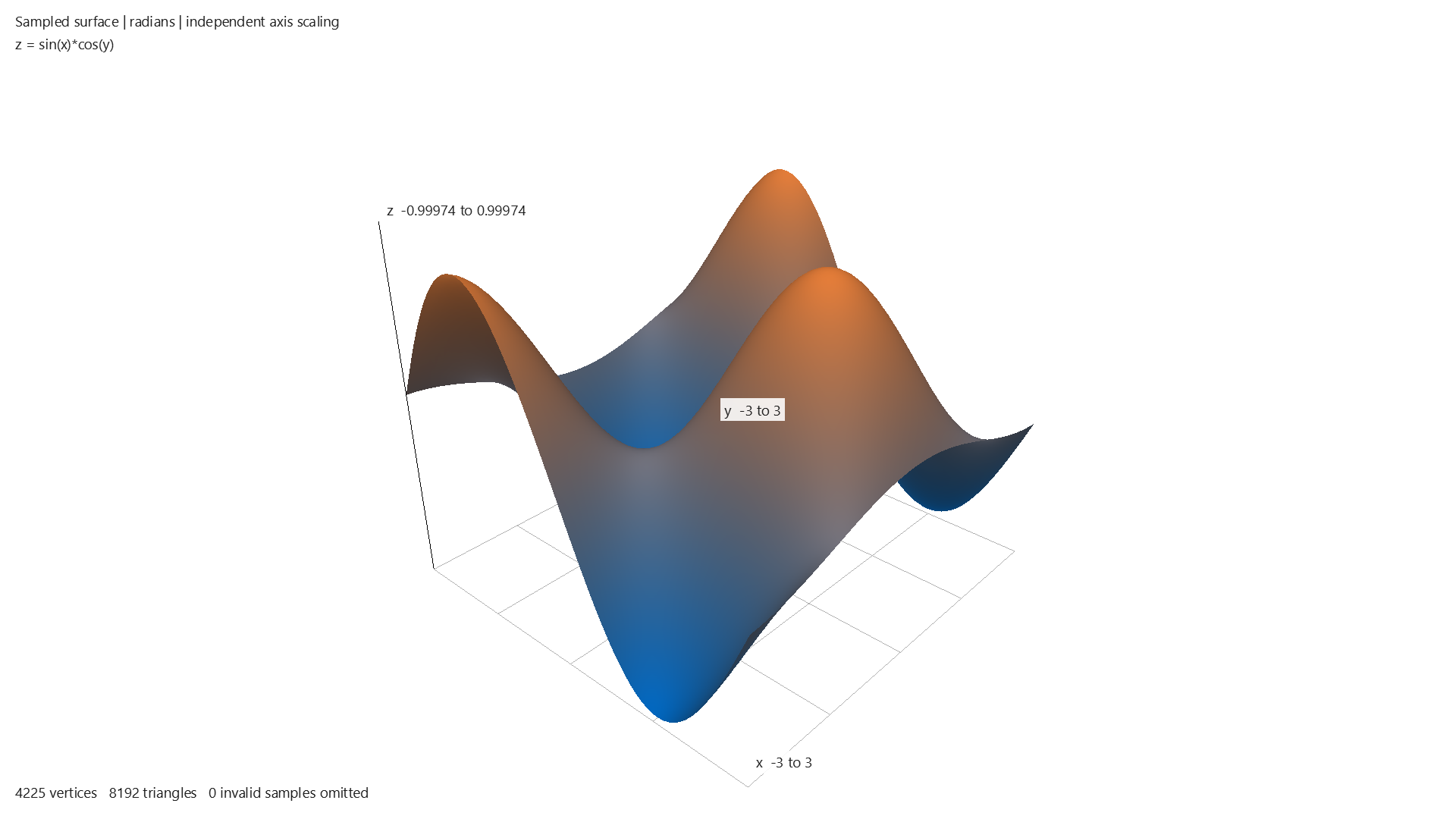
Plot your first surface
- Choose SumWise → Plot 3D surface…, or search 3d surface in Quick Insert (Ctrl+K) and choose Open tool.
- Enter the expression below in the surface tool. Set X and Y minimum to −2 and maximum to 2.
- Choose Standard — 33 × 33 samples, then press Plot.
sin(x)*cos(y)This is surface-tool input, not a calculator graph3d command. The preparation tool and rendered view are separate windows. Trigonometry here uses radians regardless of the calculator angle preference. Opening the tool or loading a preset does not calculate.
Choose a view, then explore
Use Near top (XY), Front (XZ), Side (YZ) or 3D overview. Drag or arrow keys rotate, wheel or +/− zoom, and Home/R or Reset camera resets the view. Named views preserve zoom.
Near top is five degrees from vertical, not an exact top projection or slice. Overview is a perspective view, not an isometric mode. Axes are independently normalized for display, so the picture is not a promise of equal physical scale.
Detailed — 65 × 65 samples uses a denser fixed grid. Editing resolution, bounds or expression makes pending changes; press Plot to apply them. A denser grid does not guarantee every feature or discontinuity is captured. Rejected input leaves the accepted surface intact.
Inspect → Use → Plot
- After a successful plot, expand X/Y derivatives… and select Inspect X/Y derivatives.
- Read the complete formulas for the accepted expression. X holds Y fixed; Y holds X fixed. Inspection differentiates but does not sample a new surface.
- Choose Use X derivative for next plot or its Y counterpart to stage an eligible formula. Resolve conflicting pending edits first.
- Press Plot separately to replace the accepted scene.
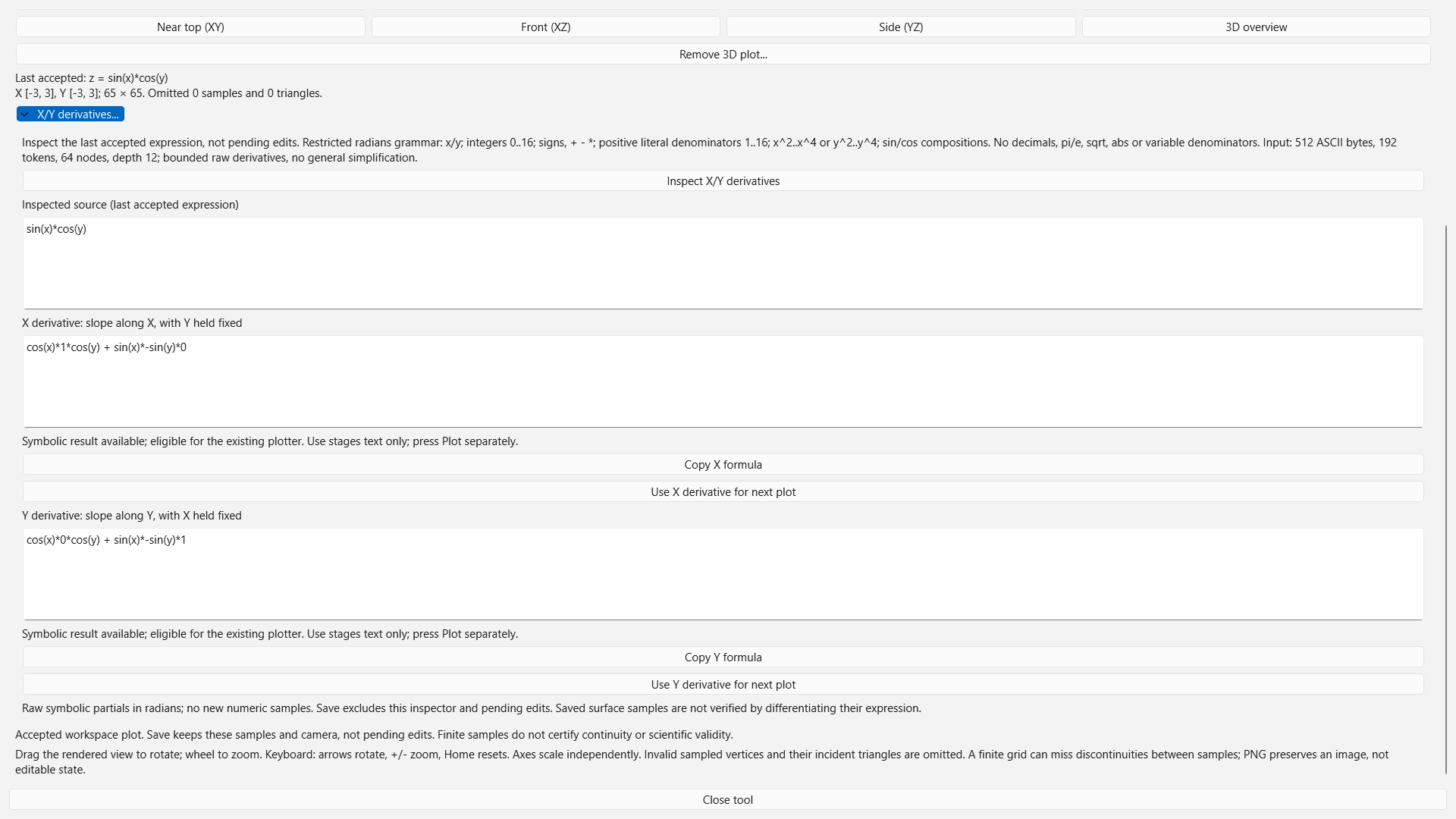
The inspector is narrower than the plotter: it accepts a restricted small x/y expression family, including certain integer powers and sin/cos compositions. Decimals, abs, sqrt, variable denominators and arbitrary symbolic formulas are not admitted for inspection. It does not promise simplified or prettified formulas.
Keep accepted work
Save keeps one last successfully plotted surface, its grid, stored heights/validity mask and camera. Fresh Open restores those samples without rerunning the expression. Reopen the 3D tool deliberately to see the saved view; only explicit Plot makes new samples.
Pending expression/bounds/grid edits and inspector fields are not persisted. PNG export is a rendered image, not an editable workspace. Workspaces containing 3D use version 5 and are not promised compatible with public 2.6 or builds without 3D.
Supported input and graphics
The plotter accepts bounded explicit real expressions using x, y, pi, e, finite numbers, arithmetic, powers, sin, cos, sqrt and abs. No assignments, session bindings, units, complex values, parametric surfaces or CAS commands are accepted here. The input is limited to 512 ASCII bytes and bounded syntax; accepted finite bounds must increase.
Invalid samples and their triangles can be omitted, leaving holes. Finite sampling does not establish continuity, exact extrema or every singularity. Compatible graphics hardware and drivers are required; support across all devices is not claimed. A graphics refusal preserves accepted CPU data and ordinary calculator work.
3D questions
Does rotating run my formula again?
No. Rotation, named views and zoom use the accepted mesh. Pending inputs wait for explicit Plot.
Can I keep multiple surfaces?
The current workspace preserves one accepted 3D surface. It is not a multi-surface scene or notebook.
Can Ask create a 3D surface?
No. Supported English plot questions route to 2D. Open the 3D surface tool for this workflow.
Are the derivatives unrestricted?
No. Inspection has a deliberately smaller grammar and work limit than plotting or typed CAS commands.
Try SumWise free for 7 days on Microsoft Store
US$24.99 one-time. No Desktop subscription. Direct purchase is separate: confirm its supplied version and manual delivery before payment.
Return to 2D and general graphing · 3.0 saved-work scope · English questions