Supported symbolic math
Symbolic Algebra Calculator for Windows
Choose a next step from a current result
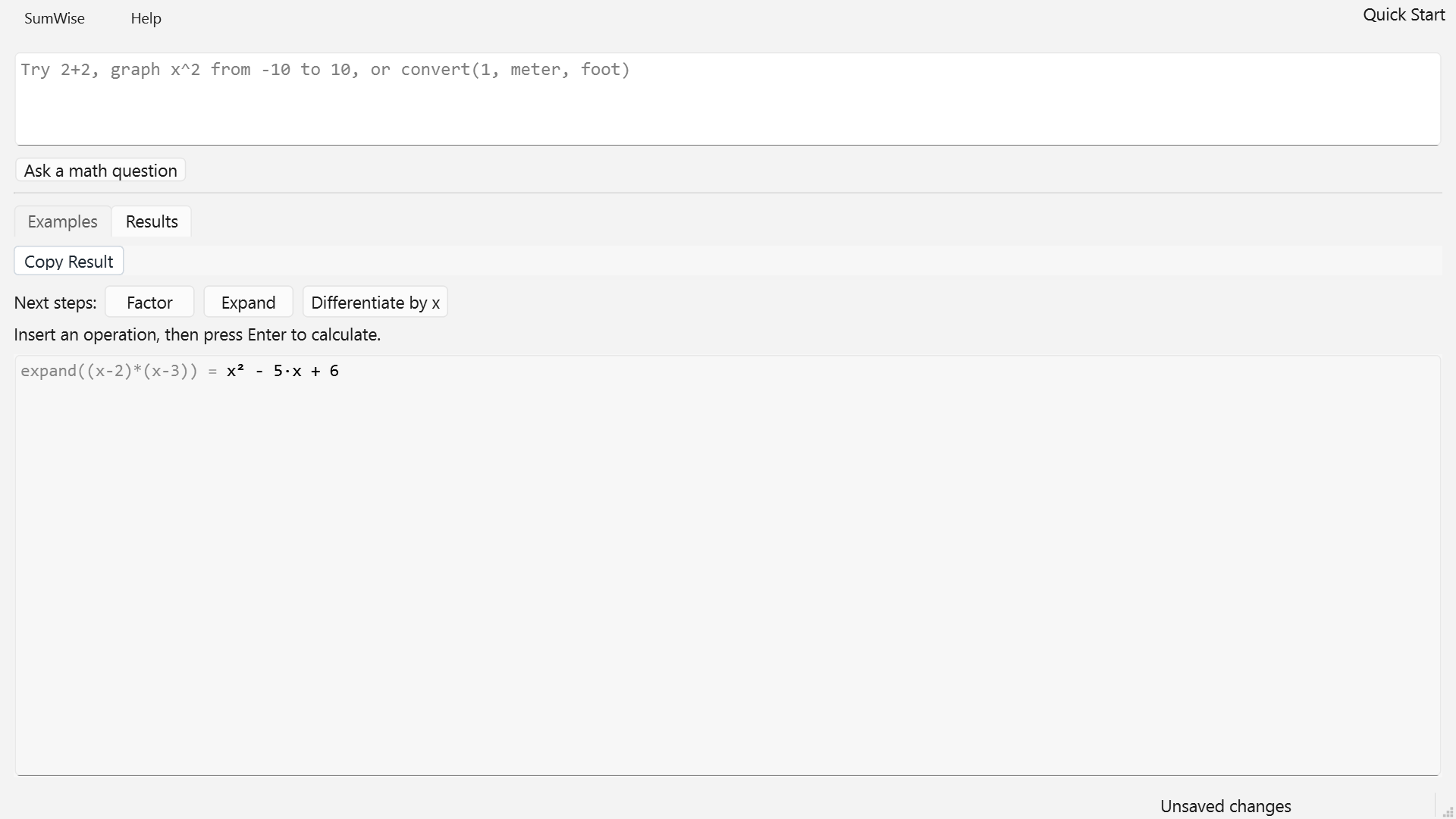
In 3.1, evaluate expand((x-2)*(x-3)). For this eligible typed polynomial, the result controls offer Factor, Expand and Differentiate by x. Choose Factor to insert a command around the result, then press Enter separately; an equivalent factored form is (x-2)*(x-3).
The row supports small bounded degree-1/2 integer-coefficient polynomials with one formal x or y. It is a convenience subset of typed CAS. A blank input or deliberate whole-draft selection is required. Display-only results from fresh Open are not executable sources for the row until deliberate typed reuse. No guaranteed simplification is implied.
Use supported symbolic expansion, simplification, polynomial
factoring, roots, solving, derivatives, and integrals inside an
approachable Windows calculator. Introduced in SumWise 2.4, stronger exact
results for conservatively eligible simplify(...)
expressions remain supported, while unsupported cases keep established behavior.
Try every supported workflow
Use the complete application free for 7 days, then continue for a one-time $24.99 purchase. No subscription.

simplify(...) calls combine supported signed and rational coefficients exactly.Supported Symbolic Scope
SumWise is designed for useful, explicit symbolic workflows rather than unrestricted computer algebra. Enter a supported function call to expand an expression, simplify an eligible form, factor a manageable polynomial, find supported roots, solve a supported polynomial equation, or connect an expression to symbolic calculus.
The in-app Function Reference provides current syntax, examples, arguments, return notes, and related guidance where metadata is available. That reference is the best place to check whether a particular symbolic form is currently supported.
Exact Eligible Simplification
For an explicit and conservatively eligible
simplify(expression) call, SumWise can combine
signed integer or rational coefficients while preserving supported
positive integral powers and multi-symbol monomials. These verified
examples show the exact result:
simplify(2*x + 3*x)Returns 5*x.
simplify(3*x/2 + x/2)Returns 2*x.
The exact 2.4 path is deliberately bounded. See the simplify() reference for eligible forms, fallback behavior, and examples that should not be generalized into a universal simplification claim.
Expand, Factor, Find Roots, and Solve
Supported polynomial workflows let you examine the same algebraic expression in several useful forms. The following expansion and factorization results are verified in the current public documentation and interface:
expand((x+2)*(x+3))Returns x^2 + 5*x + 6.
factor(x^2 + 5*x + 6)Returns (x + 2)*(x + 3).
solve(x^2 - 5*x + 6 = 0)Returns [2, 3] for this supported polynomial equation.
You can also try roots(x^2 + 5*x + 6) or the
public example solve(x^2 = 4, x). Consult the
Function Reference for current supported signatures and remember
that equation solving focuses on supported polynomial cases.

Connect Symbolic Algebra to Calculus
Supported symbolic expressions can continue into derivatives, integrals, tangent lines, definite integrals, and selected analysis helpers. Start with the derivative() reference or the Derivative and Integral Calculator for Windows guide for current syntax and scope.
Use a Graph as a Visual Check
Graphing is available beside symbolic calculation, so a supported polynomial result can be compared with its curve, roots, or extrema without switching to a separate service. The Graphing Calculator for Windows guide covers curve inspection, pinned coordinates, visual calculus, and image export.
Symbolic Workflows Run Locally
Once SumWise is installed, supported symbolic calculations are performed locally in the Windows application rather than sent to a web calculation service. Microsoft Store manages installation, the seven-day trial, purchase, and license verification.
Clear Boundaries
SumWise is not a full general-purpose CAS. It does not promise universal symbolic solving, arbitrary symbolic equivalence, or step-by-step solutions. Unsupported or uncertain expressions may remain unchanged, follow established fallback behavior, or return a scoped unsupported result. The current public Function Reference is authoritative for supported workflows.
Symbolic Calculator FAQ
Is SumWise a complete CAS?
No. SumWise provides supported symbolic algebra and calculus workflows with documented boundaries.
Does every simplify() input use the bounded 2.4 exact behavior?
No. Only conservatively eligible explicit inputs use the bounded exact path; other inputs continue through established behavior.
Can SumWise solve equations?
It supports selected polynomial solving workflows. It does not claim to solve every equation type.
Does symbolic calculation require a cloud service?
No. Supported calculations are designed to run locally after installation, subject to Microsoft Store installation and licensing requirements.
Related Symbolic Documentation
Try supported symbolic math in SumWise
Full access for 7 days. Continue afterward for a one-time $24.99 purchase. No subscription.
Choose a Windows purchase path
The full-featured seven-day trial is available through Microsoft Store only. SumWise Desktop costs US$24.99 one-time, with no recurring SumWise Desktop subscription. The separate Direct purchase section explains the initial unsigned download and manual delivery conditions before payment.
What a supported 2.6 workspace preserves: continuing calculation state and supported graph snapshots are separate from static PNG exports and selected HTML reports. Check the documented save limits before relying on a workspace.