Examples
SumWise Examples
English Ask examples and explicit results
Select English in Ask for these examples; each needs Interpret → Insert calculation → separate calculator Enter.
How far do I travel at 55 mph for 2.5 hours?Expected: 137.5 mi, assuming the stated speed is the journey average.
Convert 2.5 hours to minutes.Expected: 150 minutes.
What is 18% of 450?Expected: 81. For ordinary mathematical input, continue with the existing examples below.
Explore the 3.1 workflow
Ask a supported English math question, review/edit its interpretation, Insert calculation, then press Enter in the calculator. For 3D, open SumWise → Plot 3D surface… and explicitly Plot. The interface and bounded Ask support English, Spanish, French and German. Interface changes apply next launch; Ask language has its own selector.
Ask a supported English math question · Plot and inspect a 3D surface · 3.1 feature notes
Quantity examples for SumWise 3.1
Copy an expression alone, then press Enter. Use the Store edition of SumWise 3.1 for these workflows.
5[m] + 30[cm]in_unit(100[km]/2[h],km/h)sqrt(9[m^2])sqrt(2[m^2])Square roots give Exact 3 m and Approx about 1.41421356237 m. Exact/Approx describe represented arithmetic, not measurement certainty. Use Examples → Guided formulas → Compare scenarios for Current, varying Resistance from 1 to 4 ohm, with fixed 12 V and 24 V. Explicitly Generate four Values positions: current columns 12, 6, 4, 3 A and 24, 12, 8, 6 A. All sampled results remain Approx.
Start with one complete workflow for the released SumWise 3.1 Store edition: compare electrical scenarios, retain a mechanical variation, or inspect a small regression. The reference commands below remain available for shorter checks.
Compare ideal resistor current at 12 V and 24 V
Use synthetic voltages and positive resistance to explore I = V/R for an ideal ohmic resistor. This released SumWise 3.1 Store workflow compares resistance from 1 to 4 ohm; it is an illustrative calculation, not component selection, circuit simulation or safety advice.
- Enter this single check in the calculator input, then press Enter.
12[V]/4[ohm]The expected current is 3 A: voltage divided by resistance has current dimensions.
- Enter the comparison below, then press Enter to create the graph.
graph_quantity_compare(ohm,A,1[ohm],4[ohm],12[V]/x,24[V]/x)Alternatively, open Examples → Guided formulas and choose Compare scenarios, Current through an ideal resistor, Find Current, Vary Resistance. Enter two fixed voltages, 12 V and 24 V; set the range to 1–4 ohm and axes to ohm/A. Review assumptions and Prepare comparison, then Insert into calculator. Neither Prepare nor Insert evaluates: press Enter in the main input.
- Open Values for this graph. Set lower 1, upper 4 and four positions, then explicitly Generate.
| Resistance (ohm) | At 12 V (A) | At 24 V (A) |
|---|---|---|
| 1 | 12 | 24 |
| 2 | 6 | 12 |
| 3 | 4 | 8 |
| 4 | 3 | 6 |
Doubling voltage doubles current at each fixed resistance in this model. The descending curves show the inverse relationship; samples are not exact-root or measurement-certainty claims.
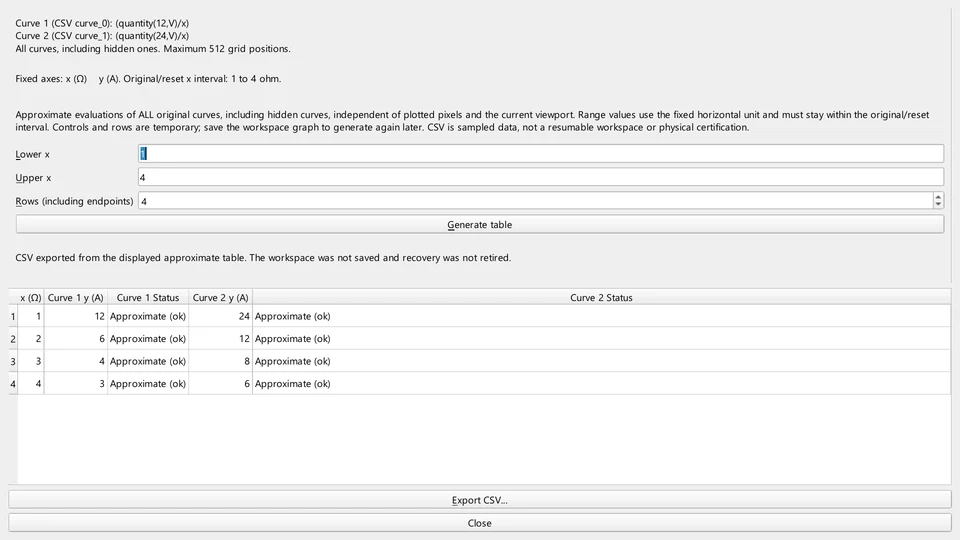
- Save the supported graph and calculations to a .sumwise workspace. Open it again to recover the saved snapshot, visibility, viewport and approximate pin. Generate Values again: the table is temporary.
- For presentation, open Export Analysis Report. Select the recorded calculation, the supported quantity comparison and, if wanted, its current generated table. Prepare/preview, then export the selected offline HTML report.
The HTML report is a presentation snapshot, not an editable workspace or live dependency. Exporting does not save the workspace. Changing an input variable does not automatically update a saved comparison.
Next: graph inspection and sharing · supported workspace and report scope.
Try this released Store workflow
SumWise Desktop is US$24.99 one-time, with no Desktop subscription. The full-featured seven-day trial is available through Microsoft Store only.
See Direct purchase and delivery details · Try for 7 days on Microsoft Store
Before Direct payment, contact SumWise to confirm the supplied version and agree delivery timing. The initial Direct download is unsigned; Windows may warn or block it. Do not disable Windows security. These examples do not establish the version delivered through Direct.
Compare kinetic energy and save a separate variation
For a synthetic mass of 2 kg moving at 3 m/s, classical translational kinetic energy E = m·v²/2 is 9 J. Doubling the speed to 6 m/s gives 36 J. Assume a fixed reference frame, positive constant mass and nonrelativistic speed; this is not rotational energy, design certification or measurement validation.
Use the released guided formula, so the application prepares its supported expression and compatible output units:
- Open Examples → Guided formulas. Choose Classical kinetic energy in single-calculation mode and Find Energy.
- Enter mass 2 with unit kg and speed 3 with unit m/s. Choose J for the result unit.
- Review the relationship and assumptions, then Prepare. Inspect the generated expression.
- Insert into calculator, then press Enter. Prepare and Insert alone do not calculate. The result represents 9 J.
- Save the calculations as a .sumwise workspace, for example energy-3ms.sumwise.
- Return to the helper and change only speed to 6 m/s. Prepare, Insert and press Enter again. The new result represents 36 J.
- Use Save As with a distinct filename, such as energy-6ms.sumwise, to retain the original file alongside the variation. Reopen either workspace to review its own retained calculations.
Dimensionally, kg·(m/s)² is energy, equivalent to J. The ratio is (6/3)² = 4: speed is squared, not simply multiplied once. These are semantic expected results, not a promise of a particular display spelling. Exact represents the arithmetic of the entered numbers; it does not make measured mass or speed exact.
The workspace retains inserted/evaluated calculations and supported variables/state. Uninserted guided fields are temporary. Saving a variation is not a live link to the original. An offline report can share selected recorded calculations; exporting a presentation does not save editable work.
Next: conversion versus quantity arithmetic · what Save and Save As preserve.
Try this released Store workflow
SumWise Desktop is US$24.99 one-time, with no Desktop subscription. The full-featured seven-day trial is available through Microsoft Store only.
See Direct purchase and delivery details · Try for 7 days on Microsoft Store
Before Direct payment, contact SumWise to confirm the supplied version and agree delivery timing. The initial Direct download is unsigned; Windows may warn or block it. Do not disable Windows security. These examples do not establish the version delivered through Direct.
Check five paired observations
Enter X = 1, 2, 3, 4, 5 and Y = 2, 4, 5, 4, 5 manually, read the slope/intercept matrix and inspect the fitted line. Follow the worked regression example; it uses PNG and workspace sharing, not the quantity-only graph report.
Related use-case guides
- Offline Calculus Software for Windows
- Unit Conversion Calculator for Windows
- Derivative and Integral Calculator for Windows
Exact fraction arithmetic
Enter 1/3 + 5/6 to get 7/6. For an exact ratio, fraction(1000/60) gives 50/3. The mixed() form separates a whole number and its remaining fraction; approx_fraction() instead approximates a decimal input. These are different operations, so retain an exact expression when its rational value matters.
Symbolic Math
1/3 + 5/6expand((x+2)*(x+3))simplify(2*x + 3*x)simplify(3*x/2 + x/2)factor(x^2 + 5*x + 6)roots(x^2 + 5*x + 6)solve(x^2 = 4, x)derivative(sin(x^2))integrate(x^2)See the verified simplify() and expand() reference pages for results and current limitations.
Graphing And Visual Calculus
graph sin(x), derivative(sin(x)) from -6.28 to 6.28graph_tangent(x^2, 3) from -2 to 6graph_area(sin(x), 0, pi) from -1 to 4graph_roots(x^2 - 1) from -3 to 3graph_extrema(x^3 - 3*x) from -3 to 3tangent_line(x^2, x, 2)definite_integral(x^2, x, 0, 3)critical_points(x^2 - 4*x + 4, x)extrema(x^2 - 4*x + 4, x)Statistics And Regression
mean(vector(1,2,3,4))standard_deviation(vector(1,2,3,4))correlation(vector(1,2,3), vector(2,4,6))linear_regression(vector(1,2,3), vector(2,4,6))Units, Constants, Matrices, And Vectors
For input shapes and expected results, see the matrix and vector guide. Vector length here means entry count, not Euclidean magnitude.
100km/h to mphconvert(100, C, F)convert(1, mile, km)cGvector(1,2,3,4)matrix(2, 2, 1, 2, 3, 4)Exact, Mixed, And Approximate Fractions
fraction(1000/60)mixed(1000/60)approx_fraction(0.3333333333)approx_mixed(16.6666667)Continue in SumWise
Try every feature free for seven days through Microsoft Store.